
How do you know which content actually influenced a deal?
A buyer might discover your company through an article, come back two weeks later through branded search, visit your pricing page, and book a demo. When that deal reaches the CRM, you may only see the branded search or the final conversion. The article still influenced the journey. Your attribution just didn’t capture it.
Content marketing attribution helps you connect those touchpoints. Where did buyers first discover you? What brought them back? Which content did they engage with before converting? And how did those interactions contribute to pipeline and revenue?
This guide starts with a practical attribution baseline and shows how to build on it as your measurement system matures. It also covers an increasingly important source of missing attribution in 2026: AI traffic that arrives without referral data and gets recorded as Direct.
What Content Marketing Attribution Measures
Attribution answers three different questions, and using one model for all three is where most reporting goes wrong.
The simplest models are first-touch and last-touch. First-touch looks at where the journey began. If someone first finds you through Google and lands on an article, that becomes the first recorded source. It shows which channels bring new visitors in. It tells you nothing about what happened afterward.
Last-touch looks at the other end of the journey. It gives credit to the final recorded interaction before conversion. If someone comes back through LinkedIn and then books a demo, LinkedIn gets the credit. Everything that happened before that point disappears from the report.
Last non-direct is a variation of last-touch. If the final session is Direct, it skips over it and gives credit to the last source you could actually identify. So if the journey is Google → LinkedIn → Direct → demo, LinkedIn gets the credit.
Multi-touch takes a broader view. Instead of giving one interaction all the credit, it looks across several touchpoints and splits credit between them. Linear, time-decay, U-shaped, W-shaped, and full-path are all different ways of doing that.
Which Content Attribution Model Should You Use?
Each model answers a different question and encodes a different assumption about which interaction deserves credit.
| Model | What it tells you | Best used when | Main limitation |
|---|---|---|---|
| First-touch | Where the buyer was first acquired | Measuring discovery and acquisition | Ignores everything that happened afterward |
| Last-touch | The final interaction before conversion | Short journeys | Earlier interactions disappear |
| Last non-direct click | The most recent identifiable source before conversion | A practical starting point | Can over-credit late-stage channels |
| Linear | Equal credit to every touchpoint | Several interactions matter | Treats every touchpoint equally |
| Time-decay | More credit to recent touchpoints | Recent interactions matter more | Can undervalue early discovery |
| U-shaped | More weight to first touch and lead creation | Acquisition and lead generation | Middle interactions get less credit |
| W-shaped | More weight to first touch, lead creation, and opportunity creation | B2B funnels with clear stages | Needs reliable stage data |
| Full-path | Credit across the full journey | Longer B2B sales cycles | Needs much more complete tracking |
| Data-driven | Credit based on observed conversion data | Large, reliable datasets | Depends heavily on data quality |
For most teams, starting with first-touch and last non-direct is enough. Multi-touch becomes more useful when the journey stretches across several sessions, interactions, or people.
How to Build a Content Attribution Baseline
If you want a simple starting point, use last non-direct attribution with a content-page filter.
The rule is: find the most recent identifiable session where the buyer visited a page you’ve defined as content, and give that interaction credit when they convert.
For example, a buyer might have this journey:
google / organic → /blog/content-attribution
↓
chatgpt.com / ai-assistant → /guides/seo-strategy
↓
newsletter / email → /reports/content-benchmarks
↓
partner-site.com / referral → /blog/product-led-growth
↓
Direct → /pricing
↓
Demo booked
Under this model, the partner referral gets the content attribution because it was the latest identifiable session that included an eligible content page. The final Direct visit is ignored.
The content-page filter is important. Without it, a later visit to /pricing, /login, or /careers could replace the content interaction you want to measure.
Before you report on it, define the rules clearly:
-
Lookback window: how far back a content touch can count, based on the length of your sales cycle.
-
Eligible pages: the page paths you consider content, such as
/blog/,/guides/, and/reports/. -
Qualifying session: an identifiable, non-Direct session that includes at least one eligible content page.
-
Identity rule: how you connect visits from the same known visitor or contact without assuming cross-device identity you cannot verify.
-
Credit rule: give credit to the latest qualifying content session before the conversion.
-
Reporting location: where this logic is applied, whether that is your warehouse, BI layer, attribution platform, or first-party event store.
Where This Attribution Setup Falls Short
First-touch and last-touch attribution start to lose context when the buying journey stretches across several sessions. A prospect might find you through a comparison article, leave, then come back weeks later through branded search and book a demo. If branded search is the last identifiable source, that is what gets the credit, even though the earlier article was still part of the journey.
Direct traffic makes this harder. A Direct session does not always mean someone typed your URL into their browser. It can also include copied links, messaging apps, in-app traffic, or other visits where the referral source was lost. That means useful context can disappear before the conversion is recorded.
The gaps get wider in longer B2B journeys. Someone might discover your content on one device and convert on another, or several people from the same company might interact with different pieces of content before one person eventually fills out the form. At that point, one recorded touchpoint cannot tell you much about the full journey.
This is where attribution becomes a data problem. The more of the journey you want to understand, the more signals you need to capture and preserve.
How to Capture Content Attribution Data
You can only attribute what you capture. If a source is never recorded, or gets overwritten when a buyer returns, you cannot reconstruct it after conversion.
At minimum, capture these fields:
| Field | What it tells you |
|---|---|
| utm_source | Where campaign traffic came from |
| utm_medium | The channel or traffic type |
| utm_campaign | The campaign tied to the visit |
| Session source / medium | How the current session was acquired |
| Landing page | Where the session started |
| Last page before conversion | What someone viewed before converting |
| Referrer URL | Which site sent the visitor |
| Click ID | Paid advertising identifiers where relevant |
| First-touch timestamp | When the visitor was first recorded |
| Last-touch timestamp | When the latest qualifying touch happened |
| Persistent visitor ID | Connects return visits where tracking and consent allow |
| Self-reported source | Where the buyer says they heard about you |
| AI source | The AI platform that referred the visit, when identifiable |
Capture the source
UTMs are especially useful for links you control. They preserve the source, medium, and campaign instead of relying only on referral data.
Keep first-touch fields fixed after the first visit. Update last-touch fields as the buyer returns. If the latest session is Direct, retain the most recent identifiable source for your last non-direct model.
A “How did you hear about us?” field adds another useful signal. It can capture sources analytics may miss, including referrals, communities, podcasts, or AI tools.
Preserve the data
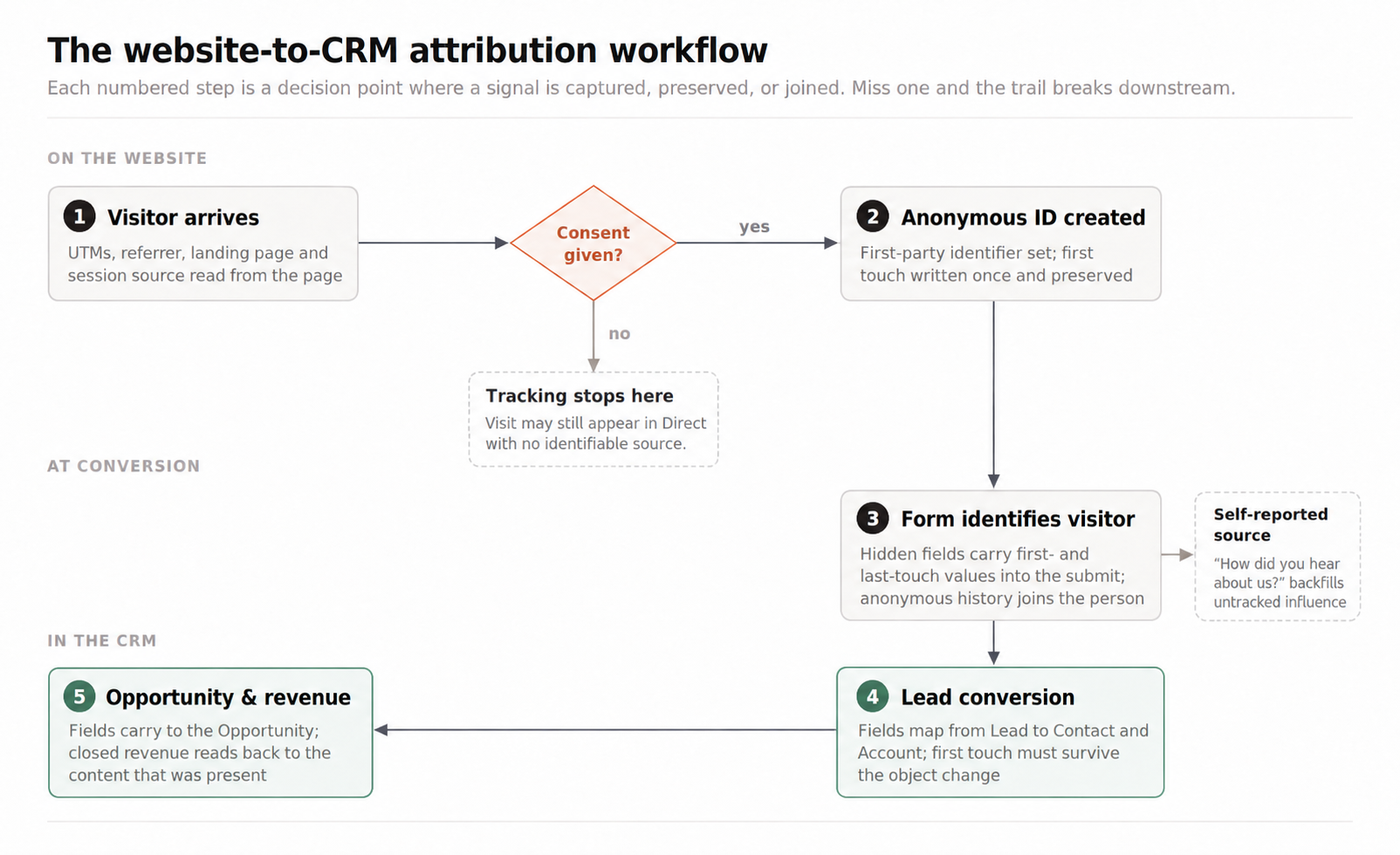
When a buyer converts, pass the attribution fields into your CRM through hidden form fields. A contact record might look like this:
Email: contact@example.com
First source: google
First medium: organic
First landing page: /blog/b2b-content-strategy
Last source: linkedin
Last medium: organic-social
Last content page: /reports/content-roi
Last touch date: 2026-08-21
Self-reported source: ChatGPT
The important part is that these fields survive beyond the initial form submission. They should remain attached to the contact as they move into an opportunity and, eventually, revenue reporting.
Links you control can also carry their own tracking. For example, separate Boki bki.sh links can be used for different campaigns to track clicks, while UTMs on the destination URL preserve the source once the visitor reaches your site.
Once these signals are captured and preserved, you have the data needed to connect content interactions to the rest of the buyer journey.
Here’s the full attribution flow, from the first anonymous visit through to revenue:
How to Set Up Content Attribution in Salesforce and HubSpot
Once the attribution data reaches your CRM, the main job is to keep it intact as the contact moves through the funnel. Salesforce and HubSpot handle this differently, so the setup is slightly different for each.
Salesforce
In Salesforce, create custom fields for the first-touch and last-touch data you want to keep.
| Salesforce field | Example |
|---|---|
| First UTM Source | |
| First UTM Medium | organic |
| First Landing Page | /blog/content-attribution |
| First Referrer | google.com |
| First Touch Date | 2026-06-18 |
| Last UTM Source | |
| Last UTM Medium | social |
| Last Content Page | /guides/content-roi |
| Last Page Before Conversion | /pricing |
| Last Referrer | linkedin.com |
| Last Touch Date | 2026-07-03 |
| AI Source | chatgpt.com |
| Self-Reported Source | Recommended by colleague |
The important part is making sure these fields survive lead conversion. Salesforce lets you map custom Lead fields to fields on Contacts, Accounts, and Opportunities (Salesforce Help).
If the first landing page is captured on a Lead but disappears when that Lead becomes an Opportunity, you lose the connection between the original content visit and the eventual deal. Map the fields through the conversion process before using them for revenue reporting.
HubSpot
HubSpot already captures some of this data. Original Traffic Source keeps the first known source for a contact, while Latest Traffic Source records the most recent one. Source drill-down properties add more detail, such as the referring domain or content URL (HubSpot Knowledge Base).
HubSpot also includes AI Referrals as a traffic source when the referral is identifiable, and can associate previously anonymous website activity with a contact after they submit a form, where tracking conditions allow (HubSpot Knowledge Base).
You can build on those native properties with a few custom fields:
| HubSpot property | Custom fields to add | What it gives you |
|---|---|---|
| Original Traffic Source + drill-downs | First UTM Source, First UTM Medium, First Landing Page | The contact’s original acquisition data |
| Latest Traffic Source + drill-downs | Last UTM Source, Last UTM Medium, Last Content Page | The latest identifiable content touch |
| AI Referrals | AI Source | A separate record of identifiable AI traffic |
| Contact activity timeline | Self-Reported Source | Extra context that source tracking may miss |
Whichever CRM you use, the goal is the same: keep the attribution data attached to the contact long enough to connect the original content interactions to opportunities and revenue.
How to Attribute AI Traffic
Loamly found that 70.6% of AI-driven visits in its dataset arrived without a referrer, while Attrifast found that 71% of the ChatGPT sessions it analyzed appeared as Direct. Both studies point to the same problem: AI traffic can lose its referral data before it reaches your analytics.
To attribute AI traffic properly, track the sources you can identify and keep the uncertain traffic separate.
-
Track recognized AI referrals in GA4. Use the AI Assistant channel, which Google added in May 2026, for traffic from platforms such as ChatGPT, Claude, and Gemini. If there are other AI domains you want to monitor, group them in a custom channel.
-
Use UTMs on links you control. This preserves the source when someone clicks a link you have published or shared through an AI platform.
-
Pass the AI source into your CRM. Store the referring platform in its own field so you can connect identifiable AI visits to signups, opportunities, and revenue.
-
Do not reclassify Direct traffic without evidence. A Direct visit to a deep article or guide could have come from an AI platform, but it could also have come from Slack, email, a copied link, or another source that did not pass referral data.
These signals are worth capturing even when AI traffic looks small. Ahrefs found AI search made up 0.5% of its traffic but 12.1% of signups, and Conductor put AI referrals at about 1.08% of sessions across its dataset. The numbers differ by dataset, but the point holds: a small share of visits can still drive real conversions.
Keep identified and inferred AI traffic separate in your reporting. A chatgpt.com referrer can be attributed to ChatGPT. A Direct visit with no source data cannot.
Content Attribution Tools and AI Visibility Tools
These two categories of tool get confused often, and they answer different questions. Attribution tools tell you which content contributed to pipeline and revenue. Visibility tools tell you how often your brand shows up in AI answers. One measures outcomes, the other measures presence.
Attribution platforms like HockeyStack, Dreamdata, Factors.ai, Cometly, and Ruler Analytics connect marketing activity to CRM data, so you can see which content showed up before a lead, an opportunity, or a closed deal.
Visibility platforms like Profound, Peec AI, Otterly.ai, and Scrunch track how a brand appears in AI-generated answers, using signals such as mentions, citations, and share of voice. That is useful for shaping your GEO strategy. Boki works on this side too: its LLM visibility feature scores a draft against a question to estimate whether an AI system is likely to cite it, which helps before you publish but does not tell you whether a citation led to a visit or a deal.
The two are worth keeping apart. A brand showing up in an AI answer is a signal of visibility. Revenue attribution needs a recorded interaction you can tie to a buyer or account and follow into the CRM.
Conclusion
A useful content attribution setup does not need to start with a complicated model. First-touch and last non-direct attribution already give you a clearer view of where buyers first found you and which identifiable source brought them back before conversion.
From there, improve the data you preserve. Keep first-touch information, update last-touch fields carefully, collect self-reported attribution, pass the fields into your CRM, and track identifiable AI referrals separately. As journeys become longer and the data becomes more complete, you can add multi-touch or account-level reporting where it is actually useful.
The goal is to understand where content appears in the buying journey well enough to make better decisions about what to create, distribute, and fund next. Attribution can show influence and contribution. It should not be presented as proof that one piece of content caused a deal.