
What’s New in Boki: Inline AI, Articles from Briefs, and a Calendar for Scheduled Posts
This release moves the AI assistant directly into the editor, lets you spin up a full article from a brief in one click, and gives social teams a calendar view of everything that’s scheduled. There’s also a wave of responsive improvements that bring the full editor to mobile and tablet. Here’s what changed and why it matters.
The AI Assistant Now Lives in the Editor
Working with Boki’s AI used to mean opening a side panel, reading the response, and bringing what you needed back into the document yourself. This release closes that gap.
AI chat actions now run inline, right where the content lives. When the AI suggests an edit, you accept, reject, or iterate on it in place without breaking your writing flow. There’s also a new Ask Boki input in the editor toolbar, so the assistant is one click away from wherever your cursor is. You no longer have to leave the document to ask a question or apply a change.
For writers, this means fewer interruptions and a tighter loop between drafting and editing. The AI feels like part of the page instead of a tool you switch to.
Create a Full Article Straight From a Brief
If a brief already exists, you can now turn it into a full article in one click. No copying the brief context into a blank document, no manual setup. The article inherits the brief’s context from the start.
This compresses the brief-to-draft step that used to eat time at the front of every piece. For teams running high content volumes, that’s a meaningful cut to time-to-first-draft.
Scheduled Posts Show Up on the Calendar
Scheduled social posts now appear on the social scheduler calendar. You get a clear visual overview of what’s going live and when, instead of scheduling into a blind spot.
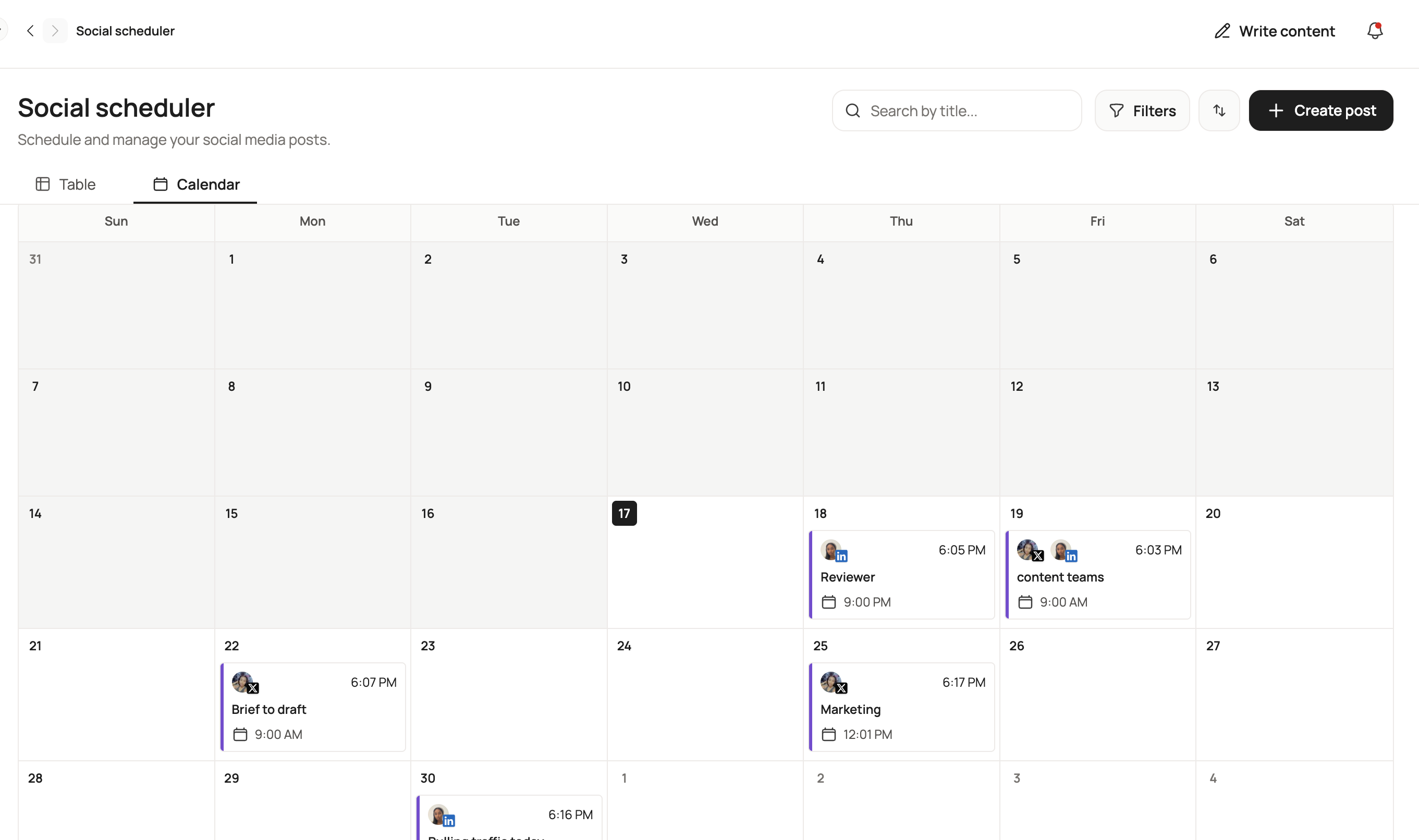
This matters most for social media managers juggling multiple accounts and formats. Seeing the full queue at a glance makes gaps and conflicts obvious before they become problems. A few related fixes ship alongside it: distributions now work even when no social accounts are connected yet, the activity feed correctly logs edits to post drafts, and character limits are now accurate for X Premium subscribers.
A Clearer View Into AI Reviews
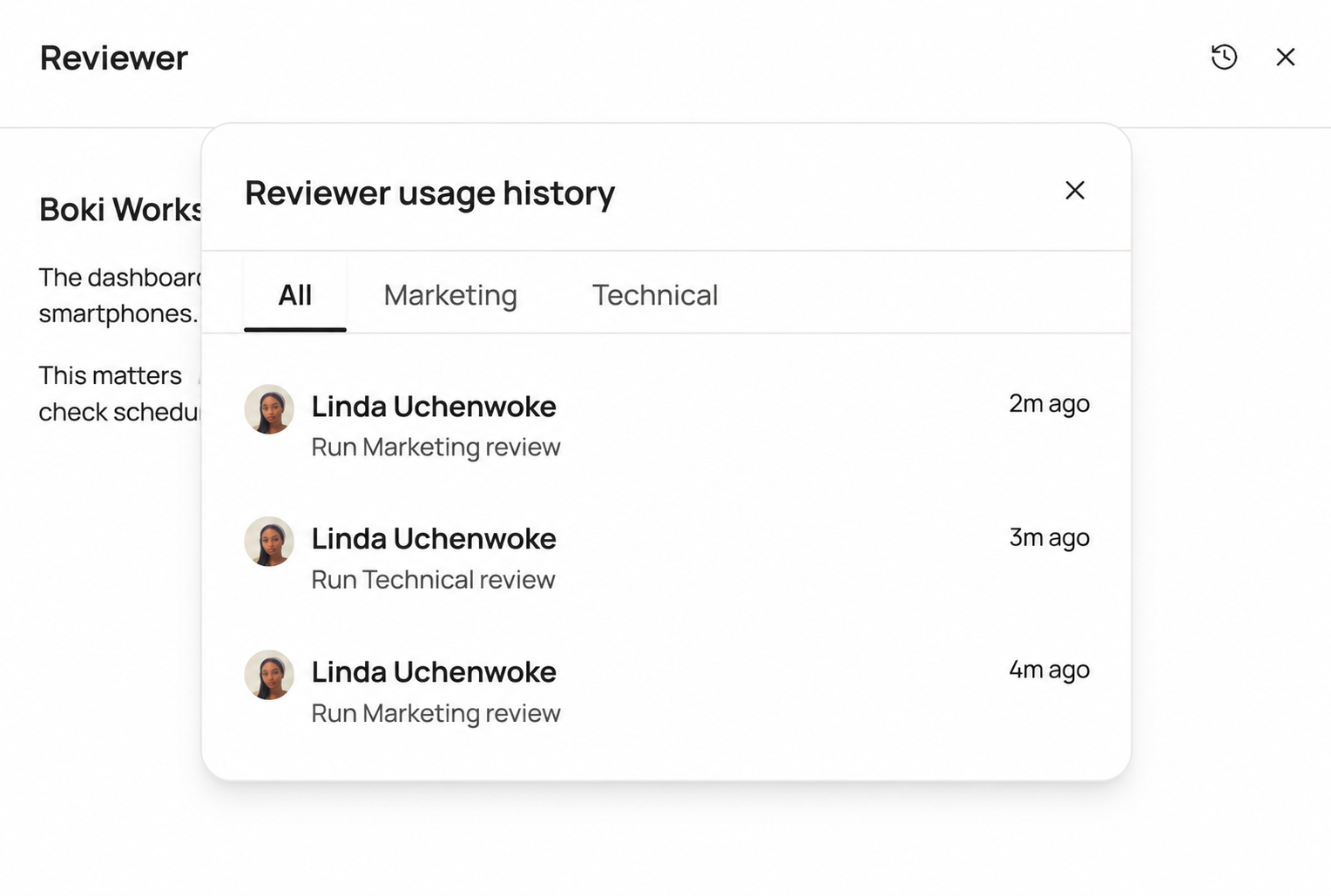
The reviewer sidebar now keeps a history of past AI reviews per document. A popover lets you filter by All, Marketing, or Technical reviews, with relative timestamps so you can see review cadence at a glance. Agent review activity is also logged now, which gives teams an auditable record of what each agent reviewed and acted on.
For anyone trying to understand how AI is actually being used across their content operation, this turns review activity from a black box into something you can track.
The Full Editor Works on Mobile and Tablet
A large part of this release went into responsiveness. The context menu, floating and fixed toolbars, version history, comments panel, typography and content block controls, and media uploads are all now fully responsive on mobile and tablet. The dashboard got tablet-friendly spacing and sizing too.
This is for the team leads and founders who review on the move and the social managers checking scheduled content outside office hours. The editor is no longer a desktop-only experience.
Reliability and Collaboration
A few fixes worth calling out because they affected real workflows.
Comment notifications fire reliably again: Notifications were dropping across the Distribution, Insights, Plan, and Scheduler sections. That’s fixed, and the over-fetching that was triggering rate-limit errors on notifications is resolved too.
No more duplicate articles: Create article buttons now disable while loading, so a slow response no longer results in two articles.
Comments and AI Agents panels work independently: Opening one used to hide the other. They now toggle separately, so you can keep both open while you work.
Mobile dropdowns hold focus: Dropdown menus now keep their focus state correctly on mobile instead of dismissing unexpectedly.
Saving and version history behaviour: Articles no longer get stuck in a “Saving…” state, and empty auto-saves are no longer written into version history, so the history list reflects real drafts instead of blank snapshots.
A handful of smaller fixes round things out: a crash when creating a distribution without connected social accounts, an overflow issue in the distribution modal when launched from a brief, inconsistent member avatar colors, stale chat message references that didn’t clear properly, uneven inline comment styling across pages, and mention suggestions that failed to load or select. The comment mention editor also got a richer experience.
Under the Hood
For teams building on top of Boki, the MCP API surface expanded significantly this release, with new endpoints covering distributions, experts, insights, plans, shortlinks, and social posts. Combined with a new inline edit decision API, external agents can now read, write, and act across the full content lifecycle. More on this for technical teams as the integration story develops.
What’s Next
This release pulls writing, review, and scheduling closer together so teams spend less time moving between panels and more time shipping. The inline AI actions and the redesigned review workflow are still evolving fast. Have feedback or want early access to what’s coming? Reach out to us on Discord.